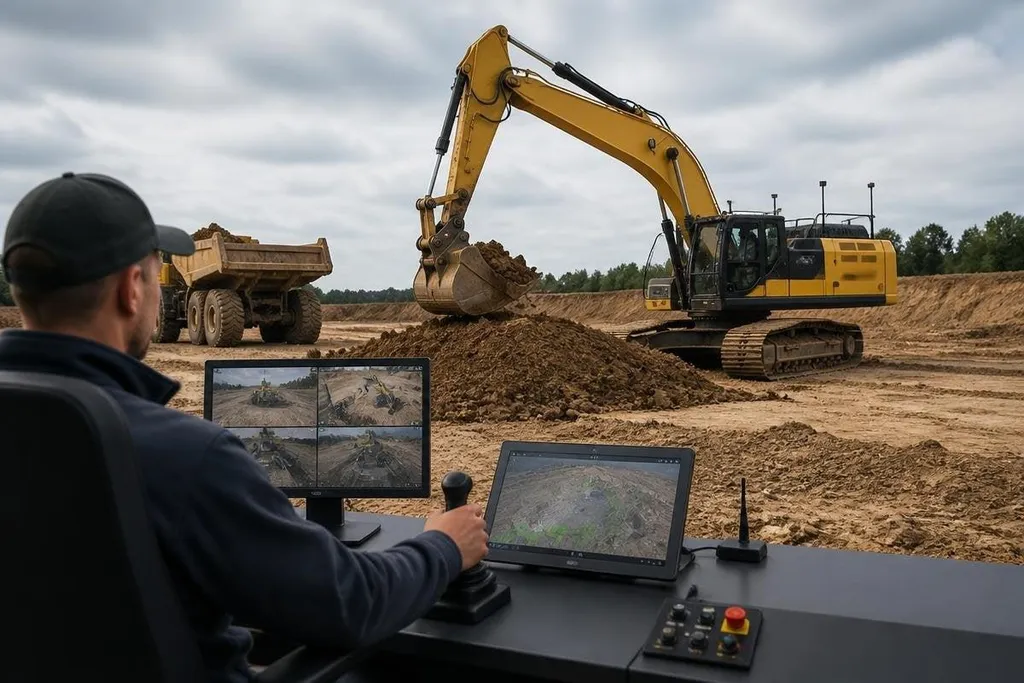
An excavator robot can dig, load, and grade while its operator sits away from the machine. That changes the safety problem first; the productivity case comes later, after the system proves it can handle uneven ground, changing soil, and nearby people.
Quick read
- Remote control keeps the operator away from unstable slopes, deep trenches, and falling material.
- Cameras, LiDAR, and position sensors help the robot map its work area.
- Human approval still matters when the machine meets an object or condition it cannot classify.
What the robot actually changes
A standard excavator puts the operator inside the work zone. An excavator robot moves that person to a remote station, where controls send commands to the hydraulic system, tracks, boom, arm, and bucket.
That setup helps when the ground is unsafe, contaminated, too hot, or hard to reach. It also lets one operator work from a location with a better view of the whole site, although the robot still needs a clear operating boundary and a safe way to stop.
Remote operation is not the same as full autonomy. In a remote-controlled system, the person still chooses where to drive, dig, and dump. An autonomous system can plan parts of the task itself, but a human may still approve a route, set a work area, or take control when conditions change.
The distinction matters to an earthmoving manager. A remote excavator can reduce exposure to danger without asking the site to trust every decision to software. That makes remote control a more practical starting point for many jobs.
How perception supports digging
The robot needs more than a video feed. Cameras show color and shape, LiDAR measures distance with laser pulses, and position sensors help estimate where the machine sits on the site.
Software combines those inputs to build a working view of the area around the excavator. That view can help the robot keep away from a marked boundary, detect an obstacle, or follow a planned digging path. It does not remove the need for site preparation. Dust, rain, poor lighting, loose soil, and blocked sensors can reduce what the robot can see.
The bucket also creates a hard problem. Soil changes as the bucket cuts through it, and the force needed to move the material changes with depth, moisture, and rock. A system that repeats a planned motion may still need a person to adjust the path when the ground behaves differently.
A smooth bucket cycle proves little about a full excavator shift. A site record from Robot 24 can place the machine, ground conditions, task, and human input beside the trial, so you can judge whether it keeps digging when the soil changes.
Where the value can appear
The first gain may come from keeping people out of places where a cab is a poor choice. Demolition, disaster response, mining, and work near unstable structures can all benefit from distance between the operator and the machine.
Remote control can also help when a specialist cannot travel to the site. A skilled operator may work from another location, while a local crew handles refueling, ground checks, barriers, and routine maintenance.
Autonomy adds more value when the task repeats. Grading a defined area or moving material along a fixed route is easier to describe in software than a job that changes after every bucket load. The more the site changes, the more often a person may need to step in.
I’d judge an excavator robot by its recovery behavior, not by a clean first pass. The useful question is what it does after a sensor is blocked, a track slips, or the bucket meets material that was missing from the site plan.
What still needs proof
A buyer needs evidence from the actual class of work, not a short video. Ask for logs from repeated tasks, details about operator workload, and records of safety stops. Ask how the system behaves after lost communications and how quickly a person can stop the machine.
Cost also reaches beyond the excavator. The site may need cameras, network coverage, exclusion zones, remote controls, training, and a technician who can fix faults. A robot that lowers operator risk but adds long setup delays may fit one project and fail another.
The open question is autonomy in messy earthmoving. Software can follow rules inside a mapped work area, but construction sites rarely stay unchanged for long. Materials shift, vehicles enter, and plans move with the job.
A buyer’s site checklist
Use these checks before a pilot begins:
- Define the task: choose digging, grading, loading, or another repeatable job with a clear finish point.
- Map the boundary: mark people, vehicles, utilities, slopes, and areas the robot must avoid.
- Test communications: measure control delay and confirm what happens when the network drops.
- Set the stop rules: decide who can stop the robot and how the machine reaches a safe state.
- Record the misses: log blocked sensors, manual takeovers, stalled work, and ground conditions.
- Price the whole site: include setup, training, support, maintenance, and the human crew around the robot.
The strongest early use case is a controlled task where distance improves safety and the ground changes slowly. Until robots show reliable recovery on ordinary sites, the operator remains part of the system, even when the cab is empty.